On the night of November 2nd, supermarket freezers in ten European countries switched themselves into defrost mode.
Three weeks earlier the same thing had happened in nine countries. Nobody had to plant malware for this.
Somebody simply logged in.
This is not an isolated prank. It is one data point in a growing list of cyber incidents across Europe
that cause physical effects, and that are attributed to Russia, suspected to come from Russia, or,
more recently, linked to Iran. Below is a (non-exhaustive) list of what happened in the last months,
followed by what I think we, as Europe, need to take away from it.
What happened
Refrigeration sabotage, two waves (October 12th and November 2nd, 2026)
Attackers took over refrigeration controllers in supermarkets in at least nine countries in the first wave
(among them Belgium, Luxembourg, Sweden, Ireland and France) and in ten countries in the second wave
(among them France, Germany, Sweden, the Netherlands, Luxembourg, Estonia and Switzerland).
In France, cabinets reportedly heated up to 50 °C, food spoiled, and some stores reported fires.
In the second wave, cold rooms of the French blood donation service EFS were hit as well;
staff reacted in time and no blood was lost.
How did they do it? Internet-exposed controllers, default passwords, outdated firmware.
No malware, no zero-day. The attackers used the devices’ built-in functions.
Pro-Russian groups Z-Pentest and NoName057(16) claimed the attacks. Security vendors see indicators of a
Russian hybrid operation, the Kremlin calls the accusations “absurd”, and the Belgian cyber security agency
honestly states that it may never be possible to identify who did it. EU Agriculture Commissioner Christophe Hansen
called it a “deliberate attempt to disrupt our food supply chain”.
(UNITED24,
watson.ch,
Tagesspiegel)
A UK power plant offline for four days (July 2026)
According to reporting that started with the Telegraph in August, Iran-linked hackers shut down a small British
power generator for four days. The wider grid was not affected, and neither the UK government nor the NCSC
has confirmed the attribution. Still, it shows that the Iran war of 2026 has a cyber front, and that it reaches Europe.
(SecurityWeek)
Bloomberg reported a series of incidents in Spain: crematorium ovens of a funeral home in Alicante suddenly stopped
working; machinery in a Catalan factory producing transformers for renewable energy malfunctioned and caused a fire.
The owners initially thought of technical glitches. Investigators link the incidents to a campaign of cyber sabotage
tied to the Russian government. The entry point: operator screens (HMIs) reachable over the internet with weak passwords.
(Bloomberg,
Red Tiger Security)
Poland: heat and power plants (December 2025, attributed July 2026)
At the end of December 2025, attackers tried to sabotage two Polish combined heat and power plants with wiper malware.
Had it worked, up to 500,000 people could have lost power – in winter. At a smaller plant, a steam turbine and the
water treatment were shut down via a private cellular network.
On July 13th, 2026, the EU and the UK jointly attributed the attack to the FSB’s Center 16 (the folks behind Turla)
and imposed their first ever joint cyber sanctions package. According to the EU, the same unit targeted infrastructure
in France, Germany, the Netherlands, Austria, Slovakia, Romania, Finland and Cyprus.
This is, by the way, the only incident in this list with a solid official attribution.
(The Record,
TechCrunch,
Circuit Magazine)
Poland: water treatment plants (charges filed August 2026)
Polish water treatment plants in Jabłonna Lacka, Szczytno, Małdyty, Tolkmicko and Sierakowo were breached –
again via default and weak passwords. Prosecutors in Białystok charged two Russian nationals for 17 attacks.
Both are in Russia, out of reach.
(TechCrunch,
TechTimes)
And the background noise
DDoS attacks by NoName057(16) around elections in Denmark, Poland and Romania – annoying, not dangerous,
but the group has become more active since Europol’s takedown operation in July 2025
(The Record).
Plus the physical side of the same hybrid war: the attempted attack on cargo planes at Leipzig/Halle airport in August,
attributed to Russia, and more than 165 suspected sabotage cases counted by the German BKA in 2026 alone
(Al Jazeera,
security-network).
What this tells us
Look at the list again and notice what is missing: sophisticated exploits. Apart from the Polish power plant
attack, none of these incidents required a nation-state level of skill. They required:
an industrial controller or HMI directly reachable from the internet,
a default or weak password,
firmware nobody updated in years,
nobody watching.
That is it. Bloomberg’s piece makes the point that many of the people behind these attacks do not even fully
understand what they are doing. They do not need to. A shodan search and a list of default credentials are enough
to stop a crematorium, flood a pipe system or spoil the food of a whole supermarket.
And attribution? It is getting blurry, and that is by design. State units, state-tolerated “hacktivists”,
copycats and bored teenagers all use the same doors. For the defender this distinction does not matter
much anyway. A freezer at 50 °C does not care who turned the knob.
We have to get our act together – yesterday
We, as Europe, can no longer afford to treat cyber security and resilience as a cost center, a compliance checkbox
or a topic for the next budget cycle. We have been warned for years. NIS2 has been on the table since 2022, and
some member states – Germany included – took ages to transpose it. The incidents above are what “later” looks like.
Here is what I think needs to happen, now:
Get industrial systems off the internet. No HMI, PLC or refrigeration controller belongs on a public IP address.
If remote access is needed, it goes through a VPN with MFA. This is not new advice. It is twenty years old.
Kill default passwords. Operators must change them, and vendors must stop shipping devices with them.
The Cyber Resilience Act points in the right direction – enforce it, and enforce it early.
Patch and inventory. You cannot protect what you do not know you have. Most affected refrigeration controllers
were old or ran outdated firmware.
Widen the definition of “critical”. A supermarket chain, a blood bank, a mid-sized factory or a small municipal
water utility is not “KRITIS” on paper, but the effects of an attack on them are very real. The long tail is where
the attackers are going, because that is where the doors are open.
Fund the small ones. The Danish water utility hacked by Z-Pentest was breached after switching to a cheaper
and less secure solution. Small operators need money, shared services and help – not just new obligations.
Detect and respond. Monitoring OT networks, having incident response plans and practising them. Several victims
in Spain thought for a long time they had a technical defect. You need to be able to tell the difference.
Plan for failure. Resilience means the lights stay on, the water keeps flowing and the food stays cold
even if something gets breached. Manual fallbacks, redundancy, spare parts, trained staff.
Treat it as security policy, not IT policy. Physical and cyber sabotage are two arms of the same campaign.
Protection of infrastructure in the real world and in the cyber world has to be planned together,
with the same seriousness we are now (finally) applying to defence spending.
None of this is rocket science. Most of it is boring hygiene that we have been preaching at conferences for decades.
The difference is that the bill for not doing it is now arriving – in the form of spoiled food, burned factories
and power plants that go dark.
I recently got a github account from my employer. So now i do have two github account, my private one and my work account.
Sometimes i do work on my work machine but want to update some source that is under my private github account.
This does not work, at least not out of the box, since on my work machine also my github work account is configured.
Github, off course, does not allow my work account to update a repository from my private account.
I solved the problem by:
adding a ssh key which is allowed to alter to my private account, onto my work machine.
adding a alias into ssh config
change the git URL in my private repositories (on my work machine) to match the alias (from ssh config)
Here are the details:
adding a new (private) ssh key
The SSH Key id_ed25519_analyzr3 is one that is permitted to access my private account.
in my ~/.bashrc i make sure it gets loaded into the ssh agent when i login or start a bash shell.
This i do with the following line. You can also do this manually each time you need to.
ssh-add ~/.ssh/id_ed25519_analyzr3
adding an alias into ~/.ssh/config
The second step is to add a host alias into my ssh config file, usually located at ~/.ssh/config.
Host scusi-github.com
	HostName github.com
	IdentityFile ~/.ssh/id_ed25519_analyzr3
        User git
change origin URL in repository git config
The last step is to change the local git config file of my (private) repository, to match my alias just added to my ssh config.
So i change the origin url from git@github.com:scusi/SomeRepo.git into git@scusi-github.com:scusi/SomeRepo.git
The relevant part looks like this, after editing
That’s it. Now i can work as normal on my work machine and update work related repositories as before. When i work on a repository from my private account i just clone it, change the URL to match the ssh config alias and that’s it. A git push works as normal, but under the hood authenticates useing a different ssh key, which is has the neccessary permissions.
Dieses Posting erklärt wie man eine Festplatte von Hand in Linux einbindet.
Die richtige Festplatte finden
Die erste Frage die sich stellt ist: Wie finde ich die Festplatte welche ich einbinden möchte.
Dazu ist es zunächst ratsam den Befehl sudo fdisk -l auszuführen. Dieser Befehl listet alle am System angeschlossenen Festplatten auf.
Wichtig hierbei ist dass die externe Festplatte NOCH NICHT an das System angeschlossen ist.
Die Ausgabe sieht ähnlich wie im folgenden Beispiel aus. Aus Gründen der Übersichtlichkeit zeigt das folgende Listing nur eine Festplatte mit 3 Partitionen. In der Praxis haben moderne Rechner eine vielzahl von Festplatten welche mit dem fdisk -l Befehl aufgelistet werden. Nützliche Hinweisgeber um die Datenträger zweifelsfrei zu identifizieren sind: der Modellname und die Größe. Im folgenden Beispiel wären dass also Samsung SSD 960 PRO 2TB bzw. 1,88 TiB.
Danach schließt man die externe Festplatte an welche man einbinden möchte und schaltet diese ein, falls nötig.
Anschließend führt man den Befehl sudo fdisk -l erneut aus und achtet auf die Unterschiede.
Im folgenden eine Beispielausgabe. Deine Ausgabe wird nicht identisch sein, aber ähnlich.
$> sudo fdisk -l
[...]
Festplatte /dev/nvme0n1: 1,88 TiB, 2048408248320 Bytes, 4000797360 Sektoren
Festplattenmodell: Samsung SSD 960 PRO 2TB
Einheiten: Sektoren von 1 * 512 = 512 Bytes
Sektorgröße (logisch/physikalisch): 512 Bytes / 512 Bytes
E/A-Größe (minimal/optimal): 512 Bytes / 512 Bytes
Festplattenbezeichnungstyp: gpt
Festplattenbezeichner: XXXXXXXX-XXXX-XXXX-XXXX-XXXXXXXXXXXX

Gerät           Anfang       Ende   Sektoren Größe Typ
/dev/nvme0n1p1    2048    1050623    1048576  512M EFI-System
/dev/nvme0n1p2 1050624    2549759    1499136  732M Linux-Dateisystem
/dev/nvme0n1p3 2549760 4000796671 3998246912  1,9T Linux-Dateisystem
[...]
Disk /dev/sdb: 1073 MB, 1073741824 bytes, 2097152 sectors
Units = sectors of 1 * 512 = 512 bytes
Sector size (logical/physical): 512 bytes / 512 bytes
I/O size (minimum/optimal): 512 bytes / 512 bytes
Disk label type: dos
Disk identifier: 0xXXXXXXXX
Device Boot Start End Blocks Id System
/dev/sdb1 128 2091135 1045504 7 HPFS/NTFS/exFAT
[...]
Im obigen Beispiel ist unsere neue Festplatte das Gerät /dev/sdb. Dieses Gerät hat eine Partition (/dev/sdb1) mit einem Windows Dateisystem.
Das ist die Festplatte bzw. Partition die wir einbinden möchten.
Einen Einbindepunkt erstellen
Zunächst müssen wir einen Einbindepunkt erstellen. Unter diesem Verzeichnis wird die Festplatte im nächsten Schritt eingebunden.
Im folgenden Beispiel heißt der Einbindepunkt windowsplatte, den Namen kann man frei wählen, einzige Vorraussetzung ist dass es dieses Verzeichnis nicht schon existiert.
$> sudo mkdir -p /media/windowsplatte
Eine Partition read-only einbinden
Zunächst ist es immer ratsam eine Festplatte nur read-only einzubinden. So kann man nicht aus versehen Daten zerstören.
$> sudo mount -o ro -t ntfs /dev/sdb1 /media/windowsplatte
Eine Partition read-write einbinden
Wenn die Festplatte zuvor read-only eingebunden wurde, wie oben beschreiben, dann kann man die Einbindung in eine read-write Einbundung wie folgt ändern:
$> sudo mount -o remount,rw -t ntfs /media/windowsplatte
Wurde die Festplatte zuvor NICHT eingebunden geht es so:
$> sudo mount -t ntfs /dev/sdb1 /media/windowsplatte
Ausbinden der Festplatte
Nach getaner Arbeit will man die Festplatte wider ausbinden. Dieses Vorgehen ist unabhängig davon ob die Festplatte/Partition read-only oder read-write eingebunden wurde.
So geht es:
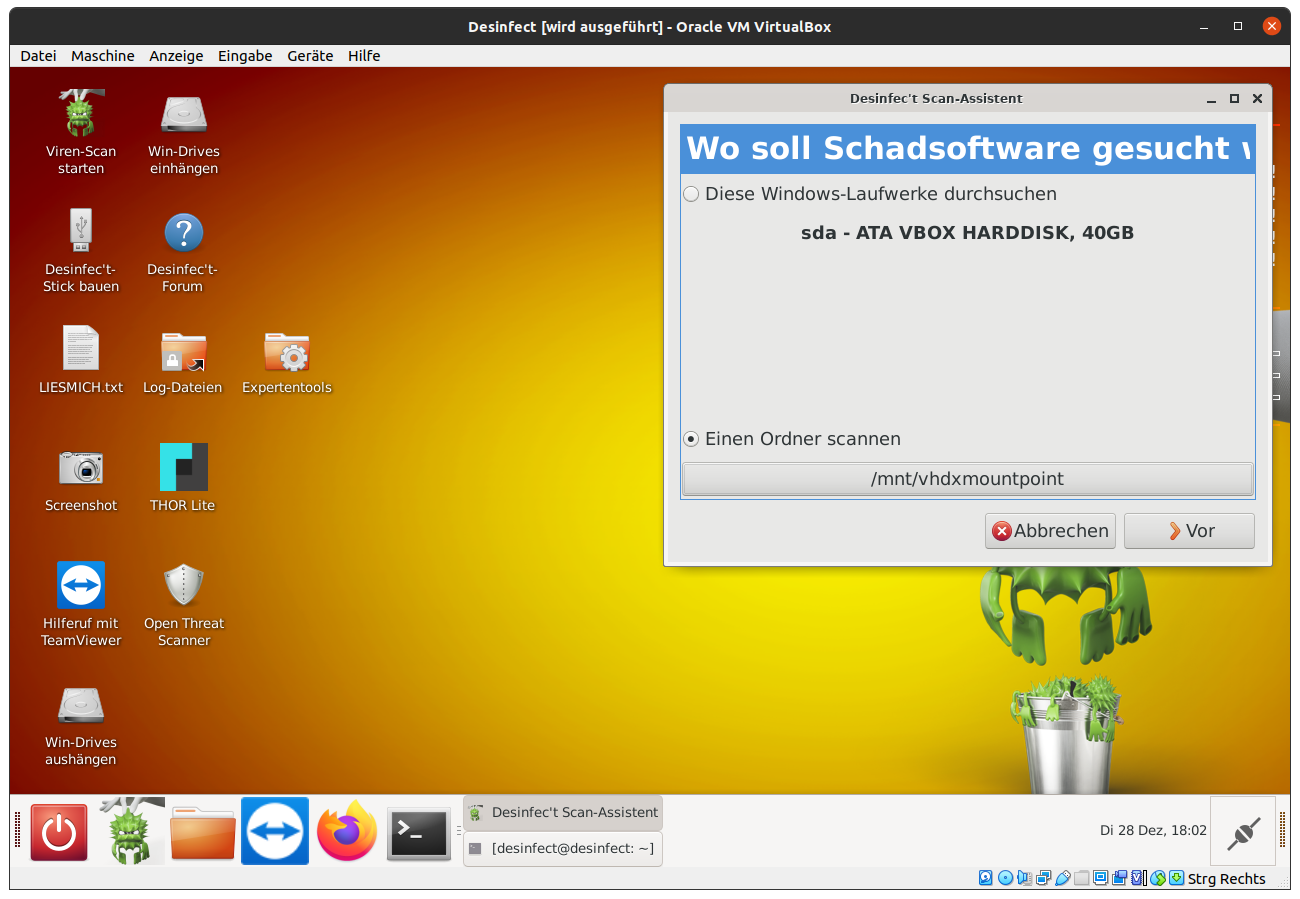
I recently had the case that i wanted to scan a image of a virtualized domain controler (DC) with desinfect.
I got the VHDX image of the virtualized DC on a NTFS formated harddrive.
In this article i will explain how to use desinfect with VHDX Images for virtual hosts.
install required software on desinfect
There are two software packages that are required: qemu-utils and nbd-client. The first one is already present in desinfect, the second one needs to be installed manually.
You can download the debian package of nbd-client from https://packages.ubuntu.com/focal/nbd-client, choose the variant of the computer architecture you are useing, usually amd64.
For AMD64 architecture you can do the following, in order to download and install the nbd-client package:
cd ~/Downloads
wget -O -J http://de.archive.ubuntu.com/ubuntu/pool/universe/n/nbd/nbd-client_3.20-1_amd64.deb
sudo dpkg -i nbd-client_3.20-1_amd64.deb
Download the mount and umount script
You have two options to download the vhdx mount and umount scripts. Either you are useing git, as explaind in the follwoing section or you just download them from the raw gist manually, as explained in the other section below.
useing git
cd ~/Downloads
git clone https://gist.github.com/86cc5ba5dfbb694d7ccf675d735541b7.git vhdx_mount
Now you can start a normal scan process to scan the content of the mounted vhdx image or a part thereof.
Choose to scan a folder and navigate to /mnt/vhdx_mountpoint or any directory underneth of it.
Out of solidarity with the LGBT community and those involved in the Stonewall riots on June 28th 1969, 0x41414141.de will change the site-banner in June accordingly.
You may had the situation yourself, you have a huge file beeing transfered via scp and suddenly the connection drops.
It would be cool if one could resume the transfer, so you do not have to transfer the whole file again but only what is missing on your end.
You can do that with rsync.
For example you did run the follwoing scp command:
scp bob@aliceserver.org:/data/huge.tar.gz
Then you can resume the transfer with rsync like this:
Have you ever asked yourself if the microphone and/or the webcam on your Mac is really off or if it is remote controlled by an attacker and spies on you?
With Oversight you will find out whenever some software tries to access your webcam and/or microphone.
More Info
KnockKnock
Do you really know what is installed on your Mac and what is loaded when your mac starts, or when you login?
Find out with KnockKnock
14d05276125e70d43e710ef186261c95 [11/55] IS KNOWN by VirusTotal
Engine 'McAfee-GW-Edition' (Version v2015) detects as 'Artemis', since update 20170516
Engine 'ZoneAlarm' (Version 1.0) detects as 'HEUR:Trojan-Downloader.Script.Generic', since update 20170517
Engine 'NANO-Antivirus' (Version 1.0.76.16894) detects as 'Trojan.Ole2.Vbs-heuristic.druvzi', since update 20170517
Engine 'Qihoo-360' (Version 1.0.0.1120) detects as 'virus.office.obfuscated.1', since update 20170517
Engine 'Symantec' (Version 1.3.1.0) detects as 'Trojan.Pidief', since update 20170517
Engine 'Fortinet' (Version 5.4.233.0) detects as 'WM/TrojanDownloader.7A51!tr', since update 20170517
Engine 'CAT-QuickHeal' (Version 14.00) detects as 'O97M.Downloader.AJK', since update 20170517
Engine 'McAfee' (Version 6.0.6.653) detects as 'Artemis!14D05276125E', since update 20170517
Engine 'Panda' (Version 4.6.4.2) detects as 'O97M/Downloader', since update 20170516
Engine 'Rising' (Version 28.0.0.1) detects as 'Heur.Macro.Downloader.d (classic) ', since update 20170517
Engine 'Ikarus' (Version 0.1.5.2) detects as 'Trojan-Downloader.VBA.Agent', since update 20170517
Actually the PDF contains 2 scripts (script_-1468562363504637198.js, script_-2641379014723298464.js) and an Office document (docm) file.
Checksums for attached_ZLOYY.docm:
MD5      (attached_ZLOYY.docm): 6cdc2649cba1a042f2db4e49ffcdfb6b
SHA1     (attached_ZLOYY.docm): f6b74cf99e7f43bec841cb72f393b787df2e811d
SHA256   (attached_ZLOYY.docm): 635d562c684e49247af1939380a662e3630c0bc675cf71bcbb13577a3f772fde
Blake2s  (attached_ZLOYY.docm): 8c7079c3d0c50369f0a0a9bf10a18db90feb454008e29e378b371f79a54df5e0
Blake2b2 (attached_ZLOYY.docm): 502131858d04bf07a21a73250df900f6adfa6d1d52437b72e70c49fe50361c70

6cdc2649cba1a042f2db4e49ffcdfb6b [8/58] IS KNOWN by VirusTotal
Engine 'NANO-Antivirus' (Version 1.0.76.16894) detects as 'Trojan.Ole2.Vbs-heuristic.druvzi', since update 20170517
Engine 'Qihoo-360' (Version 1.0.0.1120) detects as 'virus.office.obfuscated.1', since update 20170517
Engine 'TrendMicro' (Version 9.740.0.1012) detects as 'HEUR_VBA.O2', since update 20170517
Engine 'ZoneAlarm' (Version 1.0) detects as 'HEUR:Trojan-Downloader.Script.Generic', since update 20170517
Engine 'Ikarus' (Version 0.1.5.2) detects as 'Trojan-Downloader.VBA.Agent', since update 20170517
Engine 'Panda' (Version 4.6.4.2) detects as 'O97M/Downloader', since update 20170516
Engine 'Fortinet' (Version 5.4.233.0) detects as 'WM/TrojanDownloader.7A51!tr', since update 20170517
Engine 'CAT-QuickHeal' (Version 14.00) detects as 'O97M.Downloader.AJK', since update 20170517
Basically when the PDF is opened by a viewer it will launch the embedded docm file.
The docm file again contains scripts that will be executed when launched.
The scripts within the docm file trigger the download of the actual malicious payload from the following URL http://evasalome.nl/hjt67t.
What is downloaded from the before mentioned URL is not directly executable, it is somehow obfuscated.
Lets have a look at the file:
Note the pattern QGIpykOGSZ7OQphZDNsnAhG0VAMqlOGh that is reoccuring from offset 0x200 onward.
An educated guess is that the file is obfuscated with XOR and at this place (offset 0x200 - 0x2a0) the obfuscated file contains null bytes, and therefore exposes the key used for the rolling xor obfuscation used.
Let’s verify this educated guess.
We take the downloaded file (md5: 716165fb5e07ecc95d45e8761b10ab30) and xor it with QGIpykOGSZ7OQphZDNsnAhG0VAMqlOGh.
You can use my golang rolling xor implementation from gist like this.
After you built the above code you can use it as follows to undo the xor encryption.